
Sharing notes from my ongoing learning journey — what I build, break and understand along the way.
Digital CV Management: Secure, Fast, and Portable

How I Engineered a Secure and Self-Hosted CV Management System
As a Student (Systems Integration Specialist), I made it a principle throughout my education not only to manage ready-made systems, but also to understand how those systems work “under the hood.” How a server responds to a web request, how data is securely stored, and at which layers security is implemented are not just theoretical knowledge for me, but practical disciplines that must be applied.
With this motivation, I set aside standard CV templates and developed my own dynamic, secure, and database-free (flat-file) CV management system from scratch.
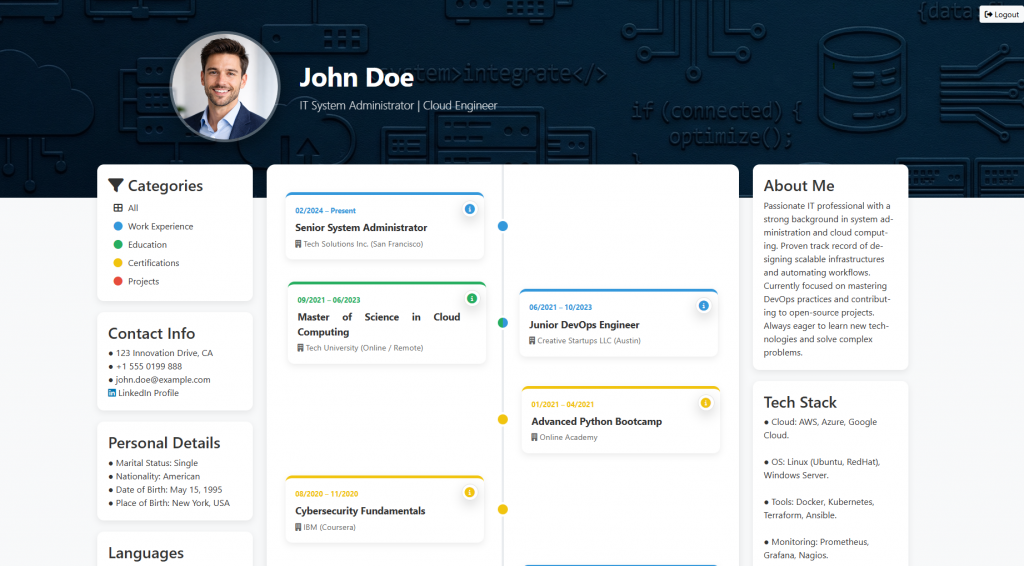
1. Why Not Static? An Intelligent and Living Timeline
Most digital CVs are essentially PDF files converted into HTML; they are static and non-interactive. However, I wanted to build a logic that does not merely print data on the screen, but actually processes it.
The system runs an algorithm in the background that analyzes the dates of my education and work life:
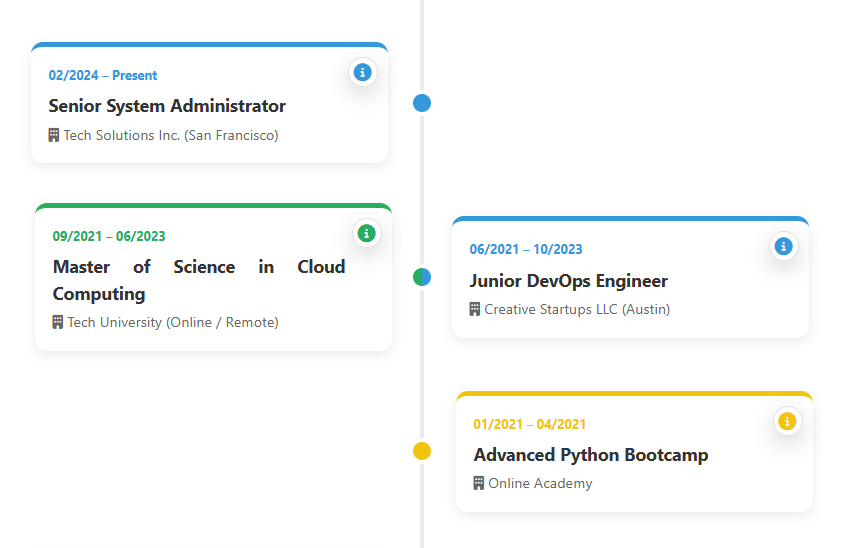
- Overlap Analysis: If I attended university while simultaneously doing an internship, the system detects that these dates overlap.
- Automatic Arrangement: Instead of stacking these two roles vertically and extending the page, it places them side by side (dual-column) on the timeline, preserving chronological integrity.
- Dynamic Flow: As dates change or a new position is added, the system automatically recalculates and rearranges the entire timeline.
2. Security Architecture: “Security by Design”
For a systems engineer, security is not a feature added after a project is finished; it is the foundation of the project. When exposing this system to the outside world, I adapted the security protocols we apply in corporate networks to the web environment.
A. Tiered Access and Guest System
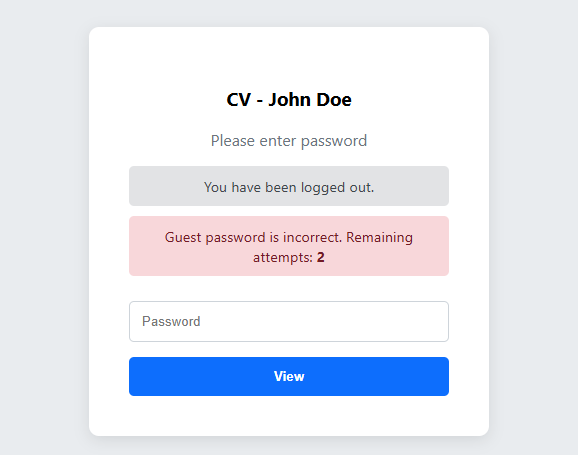
I did not want my personal data (address, phone number, etc.) to be publicly accessible on the internet. Therefore, I protected the system with a two-layer login structure:
- Admin Login: A management panel where I have full control over the system.
- Guest Login: A restricted access area where only employers with whom I share the password can view the detailed CV information.
B. Intrusion Detection and Prevention
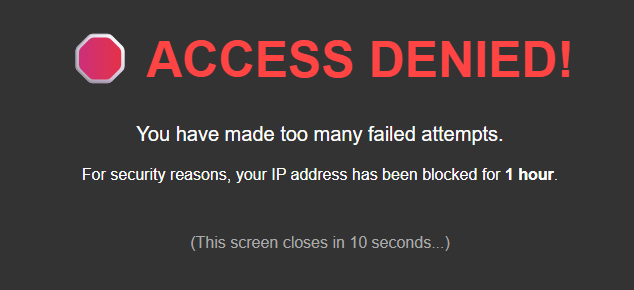
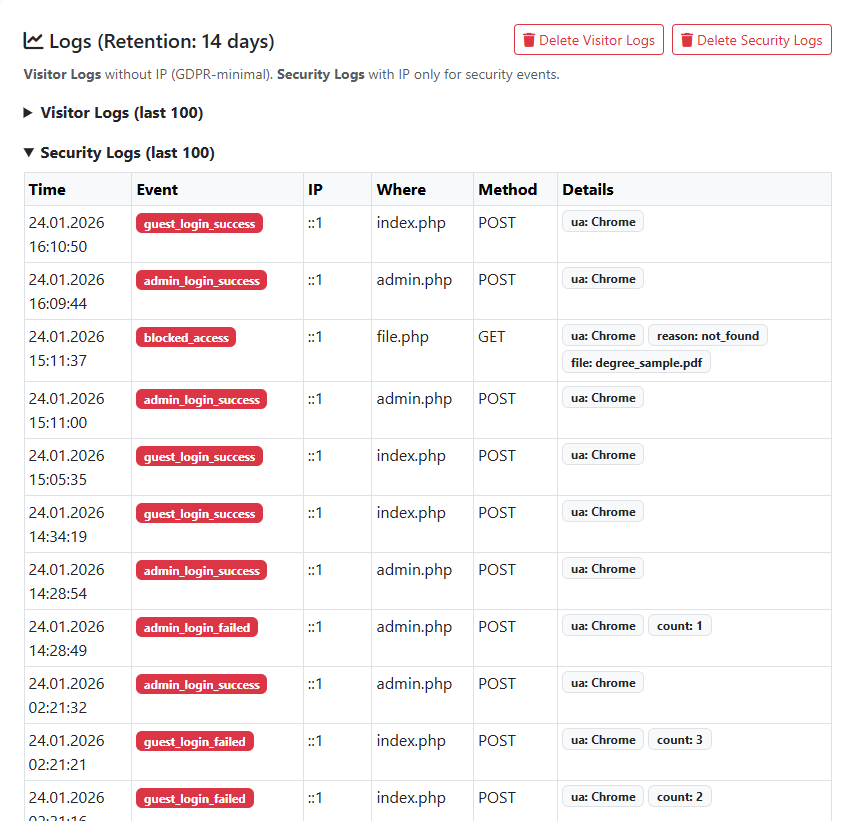
To prevent brute-force attacks against the system, I developed an IP-based counter mechanism:
- The system monitors incorrect password attempts in real time.
- When a defined threshold (e.g., 5 failed logins) is exceeded, the system protects itself and completely bans that IP address for a certain period (e.g., 1 hour).
C. Server Hardening
Code security alone is not enough; how the server communicates with the browser also matters. By adding security headers to HTTP responses:
- Clickjacking Prevention: I prevented the site from being secretly embedded and run inside another website (iframe).
- XSS Protection: I prohibited the browser from executing code coming from untrusted sources.
3. Admin Panel: Full Control Without Coding
Constantly connecting via FTP and editing files is not a modern management approach. Therefore, after setting up the system once, I designed a professional Control Panel (Dashboard) that allows me to manage all content.
- Modular Content Management: When I obtain a new certificate, it is enough to click the “Add” button in the panel, upload the PDF, and enter a description. The system automatically places it into the relevant category and date.
- Secure File Upload Protocol: When a file is uploaded to the server, the system does not rely only on the file name. It analyzes the MIME type (the actual content). If an attacker tries to upload malicious software disguised as a .pdf, the system detects it and rejects the upload.
4. A System Administrator’s Dream: Portability and Backup
As a systems integrator, my favorite topics: Disaster Recovery and Migration.
Typically, dynamic websites depend on heavy database services like MySQL. Migrating from one server to another can take hours. However, in this project I deliberately chose a database-free (flat-file / JSON) architecture.
- Why JSON? All data (profile, jobs, settings) is stored in structured text files.
- Zero Setup: When I copy this site to a completely different server, it starts working immediately without requiring database installation or configuration.
- Easy Backup: Backing up the entire system is simply a matter of copying the folder.
5. Platform Independence (Mobile Compatibility)
Today, systems are no longer accessed only from desktop computers. The interface I developed was coded according to responsive design principles.
Whether viewed on a mobile phone, a tablet, or a large monitor; menus, the timeline, and modals automatically optimize themselves to the screen size. This ensures a flawless user experience regardless of the employer’s device.
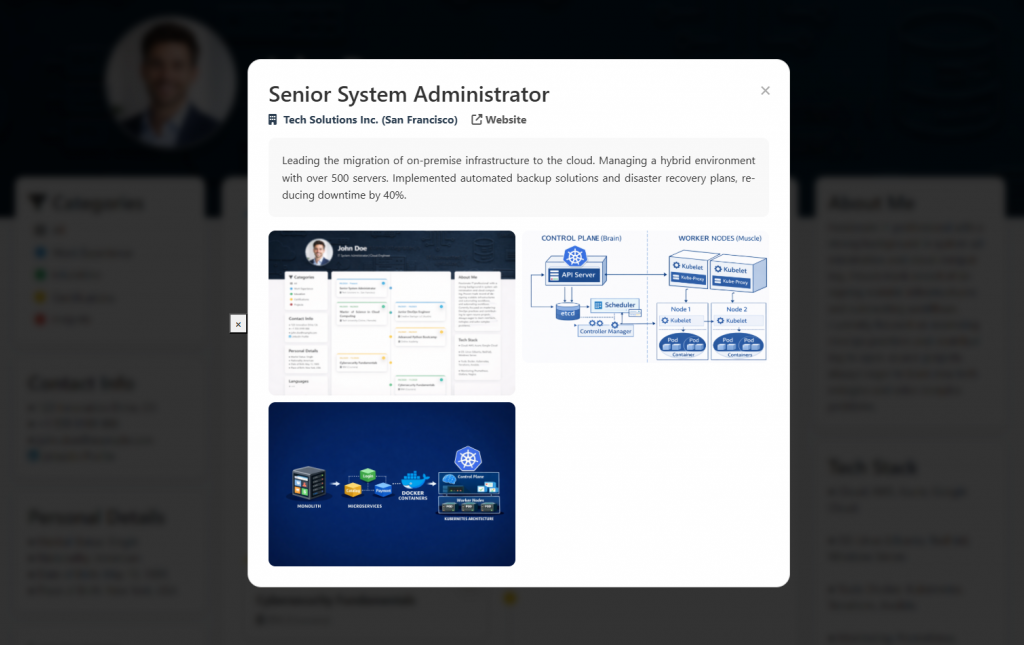
6. In-Depth Information Access: Focused Details (Modal Windows)
In a standard digital CV, all details are often cluttered on a single page, causing the reader to get lost in a mess of information. For this project, I adopted the “Summary First, Details Later” principle.
In my system, clicking on any card on the Timeline opens a stylish Modal Window (Popup) without reloading the page. This window presents rich content regarding the relevant position or education, including:
- Extended Descriptions: Technical details of the work performed,
- Project Images: Screenshots or photos of projects developed during that period,
- Links: Direct links to the company website or related projects.
This approach keeps the homepage clean and organized while allowing the employer to dive deep into the specific topics they are interested in with just a single click.
7. Monitoring and Logging
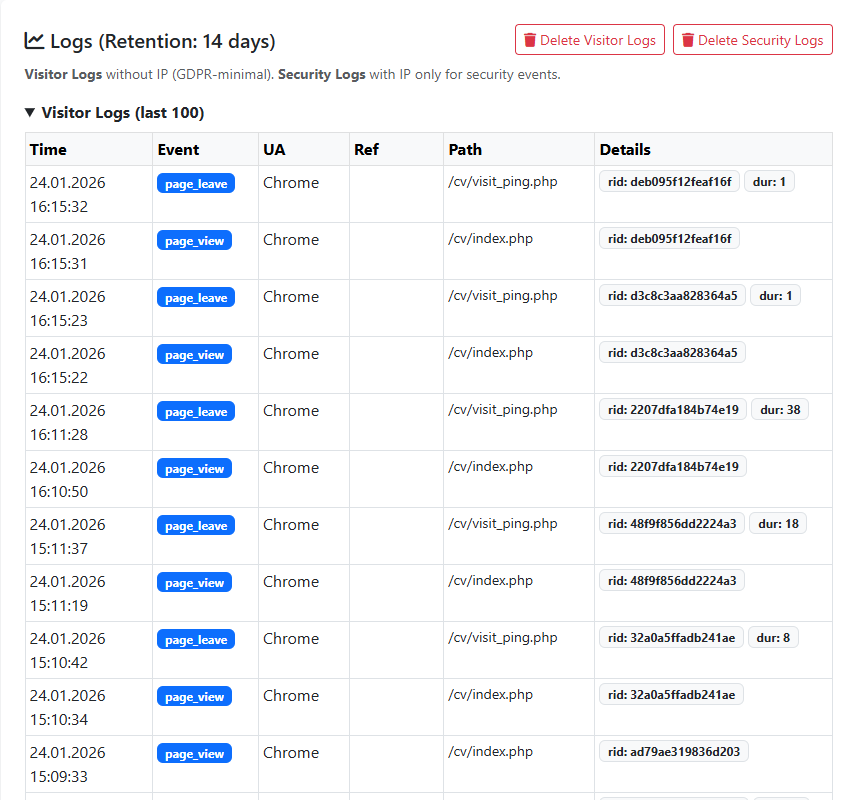
To know whether a system is running healthily, observation is essential. Thanks to the Log System integrated into the admin panel, I can monitor activities on the server:
- Access Logs: When was the site last accessed?
- Security Logs: Which IP address attempted an incorrect login, and when?
- System Logs: What change was made to the profile, and when?
These logs are the most important tools that allow me to instantly detect a potential security breach or error.
Conclusion
For me, this project is not just a CV website; it is a laboratory exercise in which I put many theoretical concepts into practice—from Linux file permissions to HTTP protocols, from data structures to server security.
As a prospective Systems Integrator, I have reinforced not only the ability to manage existing systems, but also the mindset of building secure, fast, portable, and user-friendly structures from scratch with this project.