
Sharing notes from my ongoing learning journey — what I build, break and understand along the way.
The Invisible Shield: Air-Gapped Backups vs Ransomware

Building an Air-Gapped Automated Backup System with TrueNAS and iSCSI
We live in a digital world, and whether we are a massive corporation or a small startup, our most valuable asset is our “data.” It has happened to all of us at least once; that critical report we worked on for days, our customer database built over years, or all of our company’s accounting records can vanish in an instant due to a hardware failure. However, nowadays, hardware failures are just the tip of the iceberg.
The “ransomware” roaming the dark alleys of the internet, getting smarter every day, is now our biggest nightmare. When this malicious software infiltrates your system, it doesn’t just encrypt the files you are actively using; it instantly leaps to all your network-attached backup drives. They then demand millions in cryptocurrency to give your data back.
Many IT managers fall into the illusion of “I take automatic backups every night, so I’m safe.” However, a backup drive constantly connected to your computer is like leaving the key in the safe when a thief breaks into your house!
So, how can we take our backups automatically without any human intervention, and at the same time, protect these backups from those digital thieves? Let’s take a closer look at the “Invisible Shield” architecture we built step-by-step in our lab environment, based on the military-standard “Air-Gapped” logic.
Stage 1: Infrastructure and Building the Digital Steel Safe
First, we needed to connect two entirely different server worlds that didn’t know each other. On one side is our main server (SRV2) where we produce and work on our data, and on the other side is a massive storage unit (TrueNAS) where we will store our data.
To ensure these two systems could recognize each other by name over the network, we configured DNS (Domain Name System). This way, instead of memorizing IP addresses, we named our storage server storage.gfn.internal.
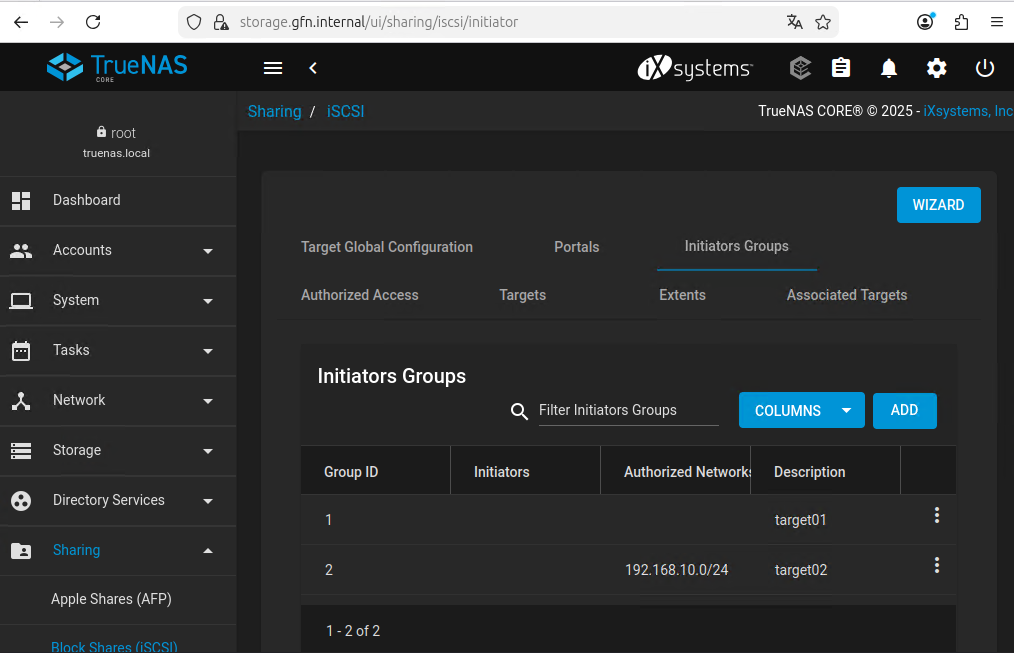
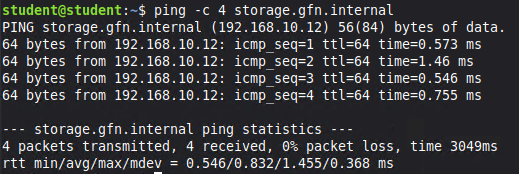
Once the path was open, we built a highly restricted “Digital Steel Safe” on TrueNAS. We placed massive virtual hard disks into this safe and linked them together using the Raid-z (ZFS) architecture, which keeps data safe against hardware failures.
Then, inside this safe, we reserved a 200 GB private, isolated room (iSCSI Target) named target02 exclusively for our SRV2 server’s backups. But we must remember the golden rule: If we leave the door to this room open to everyone on the network, viruses can enter through that door too.
Stage 2: The Invisible Data Cable (iSCSI Technology)
We set up the safe and its security. But how do we transport data from our main server to this safe? If we used standard file sharing (like Windows folder sharing), this folder would constantly appear open in the computer menu. This means there would be a permanently plugged-in data cable.
Instead, we used one of the magic wands of the IT world: the “iSCSI” protocol. You can think of the iSCSI protocol as “an invisible cable that appears out of thin air only when you enter a specific command, and instantly vanishes the moment you are done.”
Our work server calls out to the safe over the network on a hidden frequency and asks, “Is the room you reserved for me there?” (This is called the Discovery process).

After confirming the room’s location, our server connects that invisible cable (the Login process).

The most fascinating aspect of this technology is this: The moment the connection is established, our main computer sees that safe miles away as if a brand new, physical hard drive has been plugged right into its own motherboard! We are tricking the system into treating a network drive as a physical hardware disk.
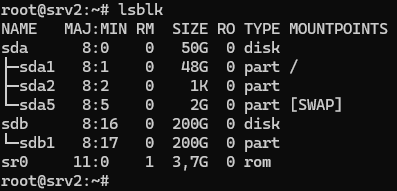
Of course, to use this new space and stack our files in it, we needed to format it into a language our operating system could understand (partitioning it with fdisk and formatting it with ext4). We formatted the space and mounted it to our system, declaring, “This is our backup point (/mnt/backup).”

Stage 3: Hiring the Watchman Robot (Smart Automation)
All the infrastructure, safes, and invisible cables are ready. But here is the real problem: It is impossible for an IT staff member to sit down at the end of every shift, manually connect this invisible cable, copy the files, and unplug the cable when finished. People sleep, forget, get sick, or make mistakes.
We needed a “Watchman Robot” that never sleeps, never gets tired, and never makes mistakes. Therefore, harnessing the power of Linux systems, we coded a Bash script (a tiny software robot) for ourselves.
This robot’s job description is extremely clear and strict:
- Wake up and connect the invisible iSCSI cable to the TrueNAS safe.
- Wait exactly 5 seconds for the safe’s doors to fully open and the network to settle (sleep 5).
- Look at today’s calendar date and create a fresh folder inside the safe with today’s date.
- Copy the company’s critical data (for example, the
/var/wwwand/etcdirectories) into this folder using an incredibly fast courier tool calledrsync. - Here is the most critical step: The moment the copying is done, unmount the system from the safe and immediately sever the iSCSI connection! (logout).
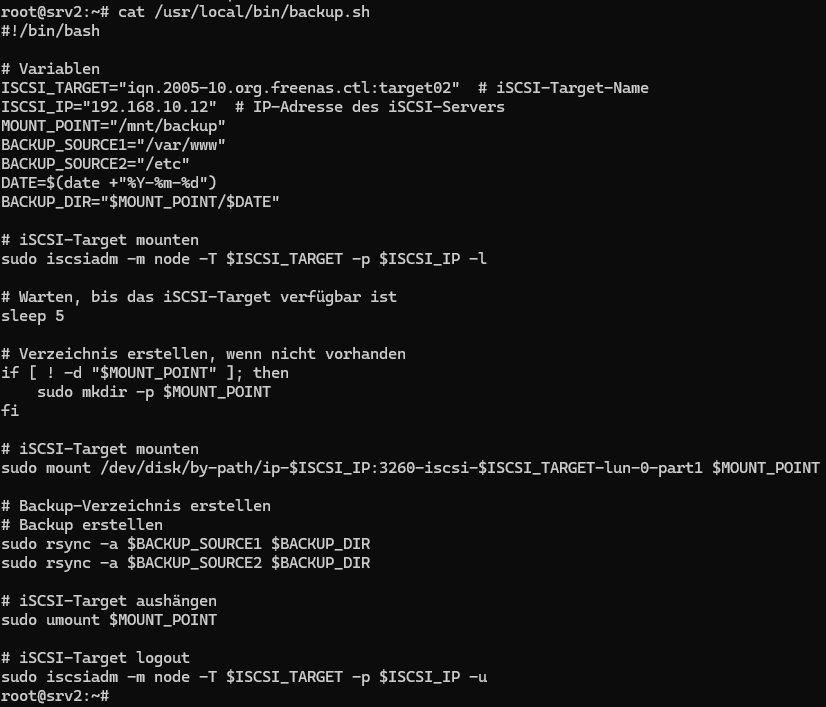
To see if the robot did its job right and how it reacted in emergencies, we ran it manually for the first time. Even though it gave us a small warning because a directory we wanted to back up didn’t exist in the system yet, it faithfully carried out its mission to the end.

Stage 4: Night Shift, Daily Reports, and Victory!
Our robot works flawlessly, but we needed to tell it what time to wake up every day. Otherwise, it wouldn’t move unless we pressed the button. We set an alarm using the system scheduler (Cron) that lies at the heart of Linux.
We set the alarm so that every night when the company closes, when everyone is asleep and no one is on the network, at exactly 01:00 AM, our system silently wakes this robot up and has it do its job. Moreover, when the robot finishes its work, it keeps a daily logbook for us, saying, “I did the copying today at this time, and no errors occurred.”

Everything looked great. But what about the outcome? To see if this clockwork mechanism we built truly bore fruit, we manually checked our safe one last time when we came to the office in the morning.
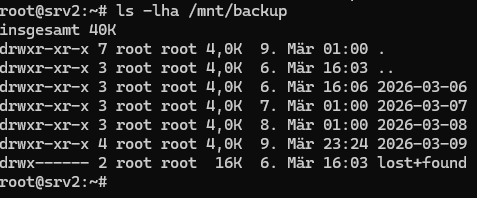
Conclusion: A Security Philosophy
Reading the article up to this point, you might look from the outside and say: “You were just going to copy files to another location. Why didn’t you just do a simple copy-paste instead of dealing with invisible cables, robots, timers, and safes?”
The answer lies in the harsh realities of the modern world. If we had used a simple copy method or a permanently open network drive, the moment a virus or ransomware infected our system, all those backups would have been encrypted and thrown in the trash.
However, thanks to this “Connect, Backup, and Instantly Escape” architecture we built in our lab, even if the most dangerous virus in the world infects our system, it is mathematically and physically impossible for it to reach our backups. Because when the virus takes over the system, it will find no bridge, no open door, and no cable. Our backups will continue to be protected like a ghost in that digital steel safe, completely disconnected from the network at that moment.
Data security is not just about setting complex passwords; data security is about designing smart architectures that can instantly destroy the paths attackers might take during a crisis.