
Sharing notes from my ongoing learning journey — what I build, break and understand along the way.
Mastering File and Directory Management in Linux Essentials – Part 2

Understanding File Systems and Core File Operations in Linux
As part of my Linux Essentials preparation, I focused today on file systems and directory management. These topics form one of the fundamental building blocks of Linux and play a critical role in understanding how the system works as a whole.
Although these operations may seem straightforward in daily use, taking a closer look at how Linux organizes and handles them reveals a highly structured and consistent approach. In this article, I’ve tried to summarize the topics I studied in a more cohesive way.
The Linux File System: A Single Hierarchical Structure
In Linux, all files are organized under a single root directory, represented by /. Everything in the system branches out from this root.
This approach makes the system more consistent and predictable. Standard directories serve specific purposes:
/home→ user data/etc→ system configuration files/tmp→ temporary files
At the user level, some commonly used shortcuts include:
~→ the user’s home directory..→ one level up.→ the current directory
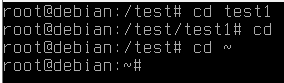
These symbols make navigation in the command line both faster and more flexible.
Location and Visibility: Core Commands
When working with the file system, one of the most essential things is being able to clearly understand your current location and what exists around you.
The most fundamental commands for this are:
pwd→ displays the current directoryls→ lists directory contentsls -la→ shows detailed output, including hidden files
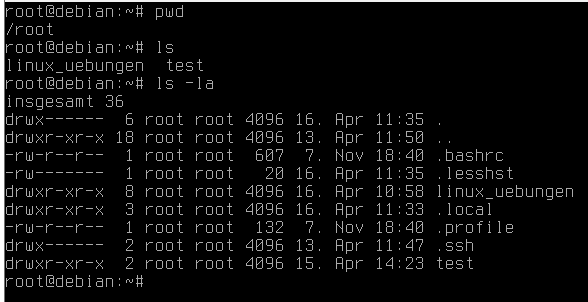
These commands are key to maintaining control and awareness while working within the system.
Creating Directories: Building Structure
In Linux, directories are created using the mkdir command. For more complex structures, the -p option allows you to create nested directories in a single step.
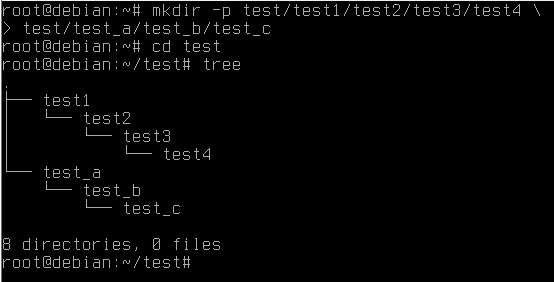
This is especially useful when setting up project structures quickly. Rather than enforcing a rigid system, Linux provides a flexible environment that can be shaped according to specific needs.
Creating Files: Filling the Structure
One of the simplest tools for creating files in Linux is the touch command.
This command:
- creates empty files
- updates timestamps of existing files
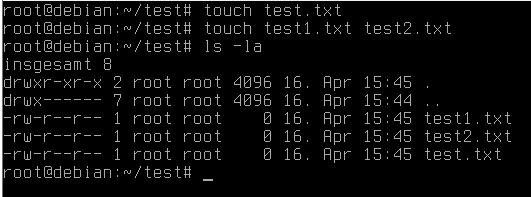
The ability to create multiple files in a single command significantly improves efficiency when working in a structured way.
Copying Files and Directories
Copy operations in Linux are handled with the cp command:
cp→ copy filescp -r→ copy directories recursively
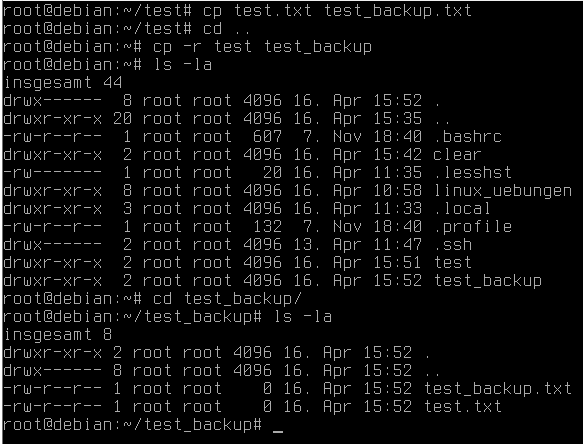
The original file always remains unchanged. This behavior is especially important for backup and versioning workflows.
Moving and Renaming
In Linux, the mv command is used for both moving and renaming.
- Moving to a different directory → changes location
- Renaming within the same directory → changes name
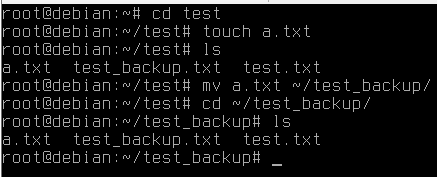
This unified approach simplifies file management by reducing the number of commands needed.
Deleting Files: A Critical Area
Deletion in Linux is permanent, so it must be handled with care.
rm→ delete filesrm -r→ delete directoriesrm -rf→ forcefully delete recursively
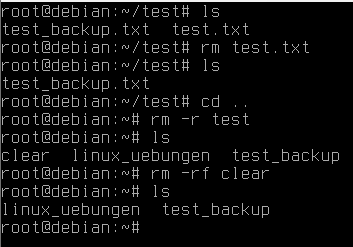
The rm -rf command, in particular, is very powerful and should be used cautiously. Always verify your current location and target before executing deletion commands.
Using Wildcards
Wildcards are widely used in Linux for batch operations.
For example:
*.log→ all files with a.logextension
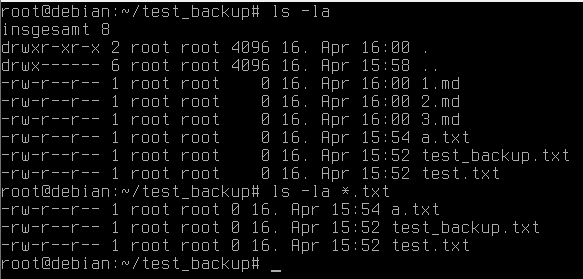
This allows multiple files to be managed with a single command, which greatly increases efficiency.
Searching for Files: The find Command
One of the most powerful tools for searching files and directories is the find command.
With it, you can:
- locate files by extension
- filter only directories or only files
- identify empty files or folders
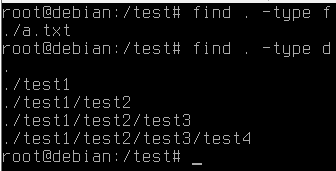
This makes file management significantly easier, especially in larger systems.
Thinking in Operations, Not Commands
One of the key takeaways from today’s work was understanding how these commands are used together rather than individually.
- creating directories
- adding files
- copying
- moving
- deleting
When combined, these operations demonstrate how flexible and powerful Linux file management really is.
General Reflection
File and directory management is one of the most fundamental yet critical aspects of Linux. Without understanding this structure, it becomes difficult to fully grasp more advanced topics.
Within the scope of Linux Essentials, starting with these concepts makes perfect sense. The habits built here directly influence future work in system administration, scripting, or DevOps.