
Sharing notes from my ongoing learning journey — what I build, break and understand along the way.
Designing a Budget-Friendly, High-Availability IT Infrastructure

Zero Downtime: Architecting a 50-User Engineering IT Setup from Scratch
Sometimes I ask myself, “If a company came to me like this, how would I build the most accurate and secure IT infrastructure for them from scratch, without any limitations?” and I create new projects in my mind or on drawing programs. Such mental exercises not only keep theoretical knowledge fresh but also develop the skill of integrating current technologies into real-world scenarios.
Today, I want to share a project that was born exactly like this. I created a scenario for myself: An engineering firm named “Schmidt & Müller” with about 50 employees, working with heavy CAD (Computer-Aided Design) files, connecting to projects both from the office and from the field (home office/construction site), is asking me for an infrastructure.
The conditions were:
- The system must never stop (Uninterrupted operation / High Availability).
- Company data must be highly secure.
- No money should be poured into meaningless software licenses costing thousands of dollars (The power of open source!).
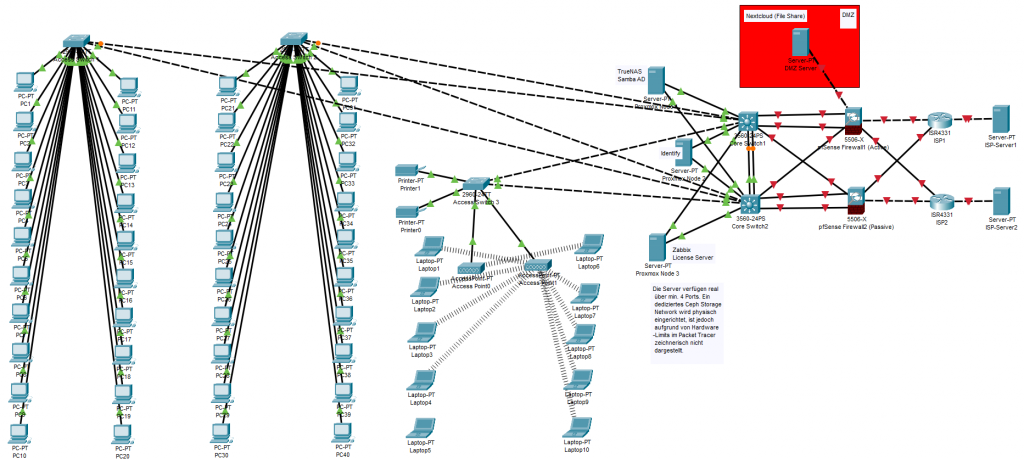
In this article, I will explain step by step how I planned such a system, which hardware and software I chose and why, in a language that even someone with no IT knowledge can understand. Towards the end of the article, I will also add a topology (infrastructure) photo showing the general architecture of the system, so what I explain will be fully pictured in your mind.
1. Our Core Philosophy: No “Single Point of Failure” (SPOF) Allowed!
Before starting to design the system, I laid out one of the most fundamental rules of the IT world on the table: SPOF (Single Point of Failure).
What is this Single Point of Failure? Let’s say you have a very powerful, massive server in your office. All your data, all your programs are inside it. One day, the power supply of this server burns out or its motherboard breaks down. What happens? Until that server is repaired, all 50 engineers stop working, and the company is paralyzed. That single server is a “Single Point of Failure”.
My main philosophy in this project was this: “Everything must have a backup, and these backups must kick in automatically.” Did the internet drop? The second line must take over. Did a switch burn out? Data must continue to flow from the other switch. Did a server crash? The system must realize this within seconds and continue working from the other servers. In IT language, we call this High Availability (HA).
2. Hardware Layer: The “Iron” Part of the Job
Before moving on to the software, I needed to determine the physical devices (hardware) that this system would run on.
Servers: Why 3 Instead of 1?
Per the uninterrupted operation rule I mentioned above, I placed 3 identical physical servers (Rack Servers) in the project. Each is a powerful machine with a 24-core processor and 256 GB of RAM.
Why exactly three? Because the system needs to be able to form a “majority vote” (Quorum) within itself. If we put two servers and the cable between them breaks, both servers might say, “I am the main server, the other one crashed!” and split the system in two (This is called Split-Brain syndrome). When there are three servers, a majority (2 to 1) is always achieved, and the system runs stably.
Network Devices (Core and Access Switches)
I divided the system into a hierarchical structure to manage network traffic:
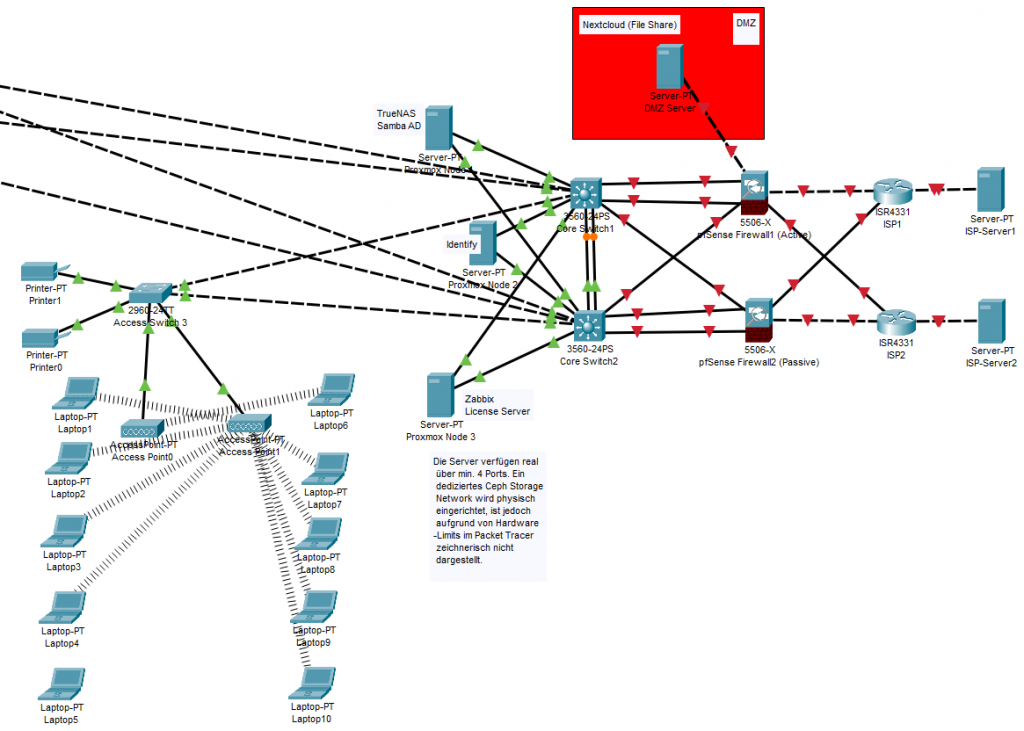
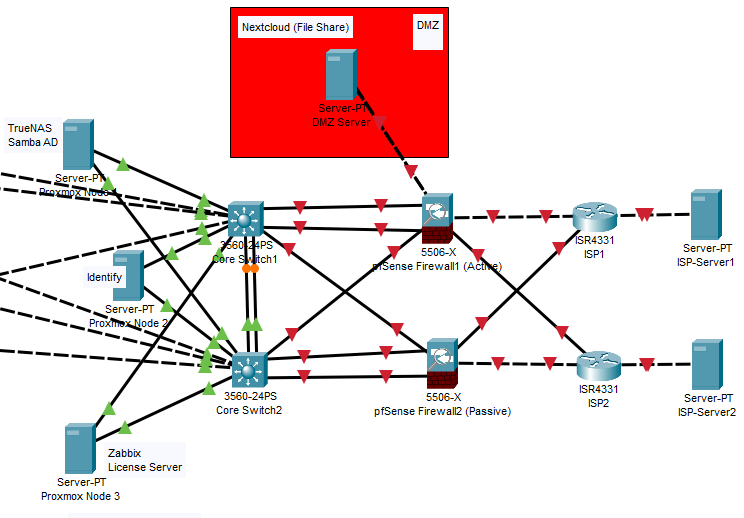
- Core Switches: The heart of the network. Here, I placed 2 10-Gigabit core switches and connected them to each other with a special cable, allowing them to act as a single device (Stack/MLAG architecture). If one breaks down, the other can shoulder the whole office. I also cross-connected (in an X shape) the cables coming from the servers to these two cores.
- Access Switches: These are standard multi-port devices where the engineers’ computers, printers, and Wi-Fi devices are connected. I connected these to the core with double cables as well.
3. Virtualization Layer: Dividing a Building into Apartments
In the past, a separate physical computer was purchased for each program (Accounting, File sharing, Security). This was both an incredible waste of electricity and a difficult system to manage. In this project, we use Virtualization.
You can think of virtualization like this: Imagine the physical servers you bought as a massive empty apartment building. Thanks to virtualization software, we build “Virtual Machines (VMs)”, which we call apartments, inside this building. Each apartment (virtual machine) has its own processor, its own RAM, and its own operating system, but they actually all use the resources of the same physical building.
Our Virtualization Engine: Proxmox VE
For this job, instead of very expensive commercial solutions on the market, I chose Proxmox VE, a wonderful open-source software. Why?
- Free and Powerful: It has no license costs but is stable enough to be used in the world’s largest data centers.
- Clustering Capability: It combines those 3 physical servers we bought like a single brain. If the 1st server catches fire, it moves the virtual machines (apartments) inside Proxmox to the 2nd or 3rd server in seconds, allowing them to continue working.
The Storage Miracle: Ceph Storage
This is, I think, the most fascinating part of the project. If the 1st server burns down, how will the virtual machine work on the 2nd server? What if the data remained on the burned server’s hard drive?
This is where Ceph comes in. Ceph takes all the physical hard drives inside the 3 servers and logically combines them into a single “Big Pool”. When an engineer saves a CAD drawing, Ceph copies this file to all 3 servers simultaneously in milliseconds. So, even if one of the servers physically disappears, a copy of the data is instantly ready on the others. To prevent this process from clogging the main network, I set up an isolated “Storage Network” between the servers where only Ceph speaks.
4. Security and Network Design: Castles and Guardhouses
An engineering firm’s data (patents, special designs) is the company’s honor. That’s why my firewall choice and network design was where I spent the most time.
Our Firewall: pfSense
Again, instead of commercial devices costing thousands of dollars, I used pfSense, the star of the open-source world (I planned two Netgate hardware devices for this).
- pfSense inspects every packet entering and leaving the company network.
- At the same time, it acts as a VPN tunnel with military-grade encryption so that field engineers can securely connect to office files from the construction site.
- And of course, I configured the pfSense devices as two units (Active/Passive). If the main firewall crashes, the backup firewall takes over the office internet without interruption.
The DMZ (Demilitarized Zone) Logic
My most important design in security was dividing the network into zones (with VLANs). Let me explain it like this for someone who doesn’t know anything: When you go to a bank, there is a waiting lounge (tellers), and there is also a high-security room inside where the steel safes are. A customer coming from outside can enter the teller area (waiting lounge) but cannot enter the steel safe.
In the IT world, we call that teller room the DMZ (Demilitarized Zone), and the steel safe is the LAN (Local Area Network). If the company has a service that needs to be offered to the outside (the internet environment), we do not put it inside the steel safe (LAN). We put it in the demilitarized zone (DMZ). Thus, even if a hacker infiltrates the server in the DMZ over the internet, the pfSense firewall prevents them from crossing into the steel safe (to the critical engineering files in the internal network).
5. Software Choices: Which Tool for Which Job?
We set up the infrastructure, the firewall, and the virtualization. Now it’s time to build the services that the engineers will actually use on top of this structure. I chose budget-friendly, license-free, but enterprise-grade (Open Source) software as much as possible.
TrueNAS (Main File Server)
This is where the engineers will store their massive CAD files. TrueNAS uses a legendary file system called ZFS. Its biggest feature is this: If a ransomware infects the company network and encrypts all files, thanks to TrueNAS’s “Snapshot” feature, you can revert all files back to their healthy state exactly 5 minutes before they were encrypted in just seconds. It stays in the internal network (LAN); no one from the outside can access it.
Nextcloud (Our Private Cloud in the DMZ)
Company employees need to share large files with clients or upload files from their phones at the construction site. Because we didn’t want to put our files on someone else’s servers like Google Drive or Dropbox, we set up our own private cloud, Nextcloud. Since it will be accessed from the outside, we locked it inside that “Demilitarized Zone (DMZ)” I mentioned above.
Samba AD (Identity and Access Management)
A centralized system is needed to manage the computer passwords of 50 employees and access controls like who can enter which folder. Usually, Microsoft Active Directory, which is very expensive, is used for this. Instead, we preferred the open-source Samba AD. It allows us to manage even Windows computers centrally and seamlessly, without paying any license fees.
The Only Exception: Why Did I Add One Windows Server?
While wanting to go completely open-source and free, I had to add one licensed Windows Server to the list. Why? Sometimes the real world is bigger than theoretical stubbornness! The “License Distribution Software” that distributes the licenses of those very expensive programs like AutoCAD and SolidWorks used in engineering firms to the office are unfortunately usually coded to run only in a Windows environment. To keep things running and ensure these programs work smoothly, I added a Windows Server to our network as a “compatibility layer”.
Zabbix (The Eyes and Ears of the System – Monitoring)
Finally, we needed to post a guard to watch over all this system. Zabbix is an open-source monitoring tool that watches all switches, servers, and hard drives on the network 24/7. When a server’s processor gets too hot or a hard drive starts failing, it emails me, “Hey, there’s a problem here!” hours before the system crashes.
6. Resource Planning (Software and Hardware Balance)
All these software programs (Virtual Machines) I described will live inside that “virtual apartment building” named Proxmox. I acted very balanced while allocating resources to them.
- Total Software Need: We need a total of about 60 GB of RAM and 24 Cores of processing power for all these systems to run smoothly.
- Our Physical Hardware: The total capacity of the 3 physical servers we bought is exactly 768 GB RAM (3x256GB).
Why is there such a massive difference? The answer again is: High Availability. Even if one or two of the servers completely burn down, the RAM (256 GB) of our last remaining server has the capacity to effortlessly boot up this entire 60 GB system all by itself and keep the office running.
Conclusion: Why Did I Think Like This?
The answer to this “How would I do it?” question I asked myself returned to me as a highly secure, scalable, and robust infrastructure design.
If I had built this system with classic commercial software (VMware, Windows Server CAL licenses, hardware SAN devices, commercial firewalls), just the licensing and initial hardware costs for the company would easily reach 100,000 Euros. However, when we combined the power of Open Source technologies (Proxmox, pfSense, TrueNAS, Ceph) with the right architecture, we reduced license costs to zero and were able to invest the entire budget only in very high-quality hardware. The result: With approximately 30,000 Euros spent on hardware, we achieved an IT infrastructure at the standards used by Fortune 500 companies (uninterrupted and redundant).
Sometimes when building a system, you don’t just connect cables; you actually build that company’s efficiency, the security of its data, and its survival reflex in moments of crisis.