
Sharing notes from my ongoing learning journey — what I build, break and understand along the way.
Mastering Archiving, Compression, and Data Processing in Linux Essentials – Part 3

Mastering Archiving, Compression, and Data Processing in Linux
As part of my Linux Essentials studies, today I focused on one of the most powerful aspects of the command line: data management. In particular, topics such as archiving files, compressing data, and processing file contents form the foundation of working efficiently with the system.
Although these operations often go unnoticed in daily use, they are actually powered by highly flexible and robust tools in Linux. In this article, I’ve tried to summarize what I learned in a more cohesive and structured way.
The Logic of Compression and Archiving
An important part of data management in Linux is file compression. Compression is used to reduce file size, providing advantages in both storage and data transfer.
The most commonly used compression tools in Linux are:
- gzip
- bzip2
- xz
Each of these tools uses a different algorithm, which results in different file sizes after compression.
To better understand this, I tested compressing the same file using different tools.
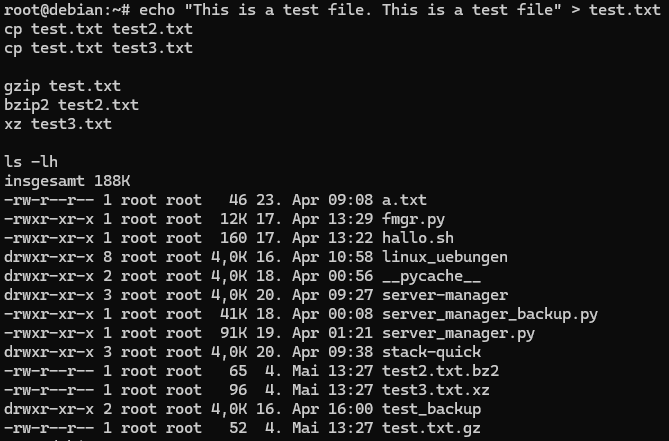
After compression, it was interesting to observe how file extensions change and how some tools remove the original file.
Decompressing Files
Compressed files can be restored to their original form using the appropriate tools:
- gunzip
- bunzip2
- unxz
When these tools are used, the compressed file is removed and replaced by the original version.
I verified this behavior through testing.

Archiving with tar
To combine multiple files into a single file, the most commonly used tool in Linux is the tar command.
With this command:
- Multiple files can be grouped into a single archive
- Directory structure is preserved
- It can be used together with compression if needed
First, I created a directory and moved files into it before archiving.

Then, I listed the contents of the archive to verify that the files were correctly included.
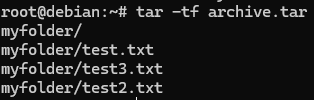
Finally, I extracted the archive and confirmed that the files were restored.

This process provided a clear understanding of how archiving works in practice.
Output Redirection
In Linux, redirecting command output to files is a very powerful feature.
For example:
>→ overwrites the file with new content>>→ appends content to the end of the file
To observe the difference, I performed a simple test:
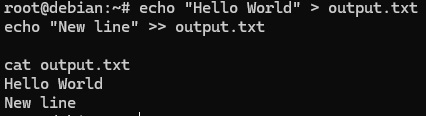
This made it easy to clearly see the difference between overwriting and appending.
Redirecting Error Messages
In Linux, it is also possible to redirect error messages separately from standard output.
2>→ redirects error output to a file
I tested this behavior by attempting to access a non-existent file.

The English equivalent would be: ls: cannot access 'non-existent-file': No such file or directory.
This method is especially useful for logging and debugging processes.
Using Pipes
One of the most powerful features of the command line is the ability to chain commands together.
With the pipe (|) operator:
- The output of one command
- Becomes the input of another
I tested this with a simple example:
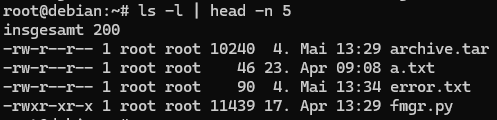
This structure is especially useful for filtering large outputs.
Data Counting and Filtering
In Linux, the wc command can be used for quick data analysis.
For example:
- counting lines
- counting words
I combined this command with pipes to analyze output data.

Searching Text with grep
One of the most powerful tools for searching within text files is the grep command.
Case sensitivity is an important detail when using this command.
To demonstrate this, I performed the following test:

In the first command, only exact matches were found, while the second command performed a more flexible search.
General Reflection
One of the key takeaways from today’s study was realizing that data management in Linux is not just about individual commands.
- compression
- archiving
- redirection
- filtering
- searching
When combined, these operations clearly demonstrate that Linux provides a powerful data processing environment.
Within the scope of Linux Essentials, learning these concepts is essential for building a strong foundation for more advanced system administration and automation tasks.