
Sharing notes from my ongoing learning journey — what I build, break and understand along the way.
SAP HANA Administration Notes – Part 3: Configuration, Start/Stop, and Delta Merge

What I Learned While Navigating SAP HANA Cockpit Administration in a Training Environment
⚠️ Note: This content was prepared in a training environment provided through SAP Learning Hub. The data used is for testing purposes only. In line with SAP rules, no full-screen screenshots were shared. Only partial screenshots were used to show the relevant menu, warning, and context.
In the previous articles, I covered:
In this article, the focus shifted more toward the operational side. I mainly worked through the following topics:
- Clarifying the user and group structure inside Cockpit
- Understanding the differences between Database Directory, Overview, and service screens
- Working with configuration parameters
- Seeing what happens when a change requires a restart
- Testing the logic behind delta merge in practice
This is not a summary of a training guide. On the contrary, it is a collection of notes from the moments when I was searching for menus, entering the wrong screen, getting errors, and eventually finding the right path.
1. Starting Point: Making the Cockpit User and Group Structure Clear
The first thing this section taught me was this: before moving on to admin operations, visibility and permissions on the Cockpit side really need to be in place.
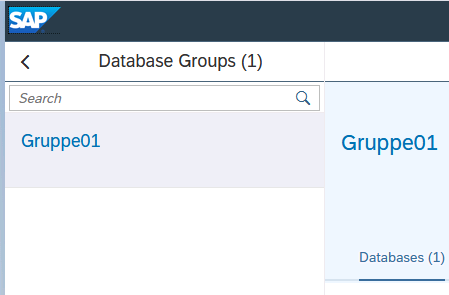
First, I checked that the database group had been created and that the related structure was visible.
Then I verified that the Cockpit user was active.
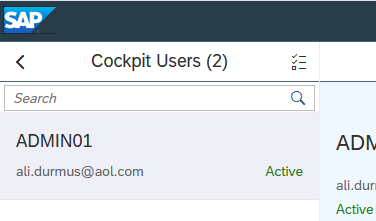
This may look like a small step, but it is actually critical, because later on, when you move into the database management screens, the answer to the question “Why do I not see this menu?” often starts here.
2. In Start/Stop Operations, the Real Difficulty Is Finding the Right Screen
At first, one of the things I struggled with most was not actually stopping and starting the database, but understanding which screen I was supposed to use.
My first reference point was the Database Directory screen:
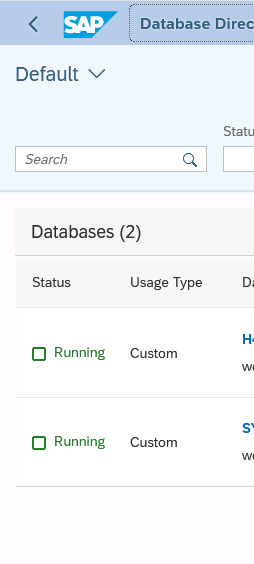
From here, both the tenant and SYSTEMDB can be seen together. But the key detail is this: when you click into the tenant, the first screen that opens is not directly the stop/start screen.
When I entered the tenant, I first landed on Database Overview:
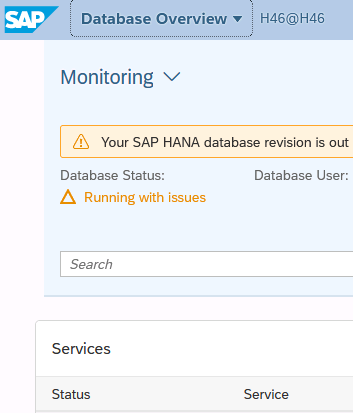
Then, after going one step further, I ended up on the Manage Services screen:
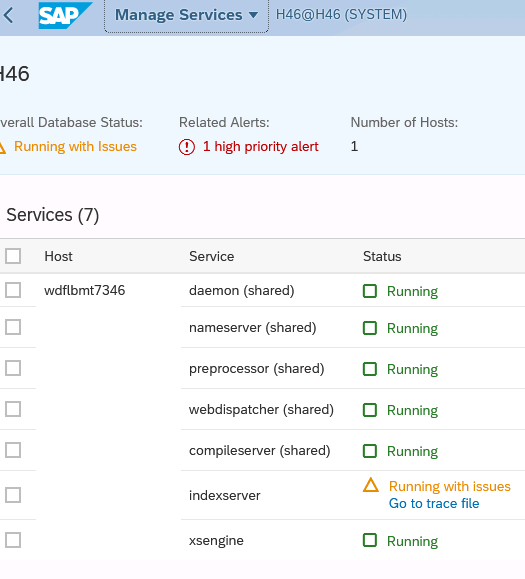
This was where I realized something very clearly:
In SAP HANA Cockpit, being able to perform an operation and being able to find the correct screen for that operation are two different skills.
The first place where I clearly saw the stop action in context was the tenant stop dialog:
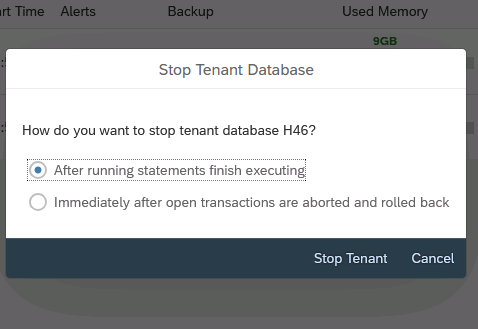
After that, I was able to confirm that the database had actually stopped from the Database Management side:
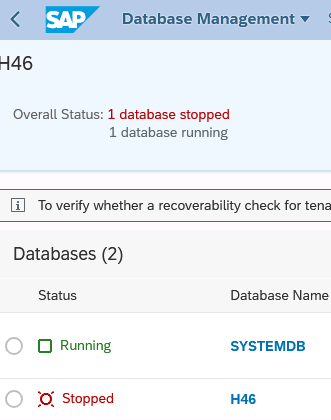
The most important lesson this section left me with was this:
- The Directory screen gives context
- The Overview screen shows status
- The Services screen provides a service-level perspective
- But for operational actions, you need to know the correct menu flow
3. The Real Answer to “Where Is Manage Database Configuration?”
On the configuration side, the biggest challenge was navigation before it was technical.
For me, the turning point was this screen:
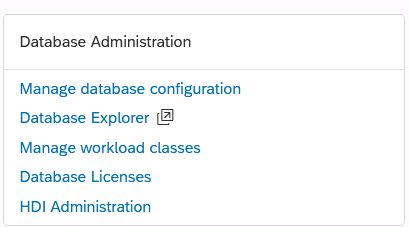
Because this screen clearly shows where the Manage database configuration option is opened from. Many things that did not appear while I was navigating through Monitoring started to make sense once I moved into the correct administration context.
At that point, I understood something much more clearly:
In SAP HANA Cockpit, the configuration menu is not hidden; it is context-sensitive.
4. Changing a Parameter: The Real Issue Is Not the Value, but the Context
Once I entered the configuration screen, I saw that changing a parameter is simple in theory, but in practice it requires attention.
The relevant file, section, and parameter flow looked like this:
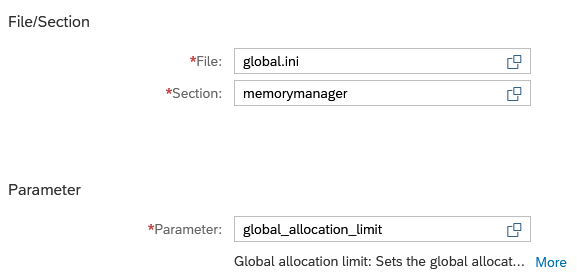
What I learned most clearly here was:
- The file you are working in matters
- The section you are changing matters
- But most importantly, the layer where you make the change matters
Because in SAP HANA, changing a parameter is not just about entering a value. It is also about defining how the system should behave at a specific level.
Layer logic
- DEFAULT → SAP’s standard behavior
- SYSTEM → system-wide override
- DATABASE → tenant-specific override
One of the screens that helped me understand this better was the point where I could see different layer views of a specific parameter side by side:

This image alone says a lot: the same parameter can carry different values in different layers.
5. If a Restart Is Required, It Is No Longer Just a Database Task
After a parameter change, Cockpit showed me this warning:
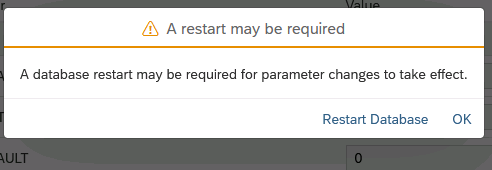
In other words, the change had been accepted, but a restart might be required for it to take effect.
So far, everything was normal. But during the restart process, I ran into a second screen that was even more instructive:
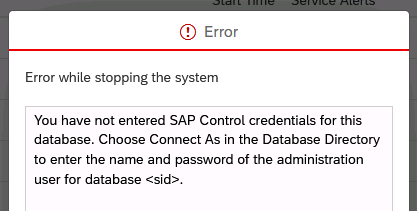
This error taught me something very clearly:
Some changes you make through Cockpit may look like database tasks on the surface, but in practice they reach down to the OS level.
So in operations such as restart, the Cockpit user alone is not enough. The related SAP Control / operating system credentials are also required.
This shows that SAP HANA Cockpit is not just “a nice UI”; it is coordinating serious operational flows behind the scenes.
6. Delta Merge: A Small Test That Teaches a Big Idea
This was the simplest part of the section, but also one of the most instructive. It happened on the Database Explorer side.
This was the screen where I switched into the relevant tool:
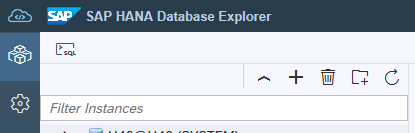
There, I used a small test table, inserted some rows, and then manually triggered a delta merge.
There was no dramatic result on the screen afterward, but the exercise made SAP HANA’s write/read optimization logic much more concrete for me.
Because delta merge basically teaches this:
- data first goes into a structure optimized for fast writes
- then, when appropriate, it is moved into a structure optimized for reads
In my test scenario, the data volume was very small, so there was no visible impact after the merge. But that is exactly why it was useful. It taught me something important:
Not every successful technical operation has to produce a big “result screen” for the user.
Sometimes the system simply tells you, quietly, that the operation completed.
7. Main Lessons I Took Away from This Section
Menu knowledge matters as much as technical knowledge
Looking for the right thing in the wrong screen costs time.
Directory, Overview, and Services are not the same
They all belong to the same database, but they serve different purposes.
Configuration changes are about context
File, section, parameter, and layer all need to be considered together.
Restart operations are a different world
A task that starts on the DB side can extend all the way into OS authentication.
Delta merge looks small on the surface, but is conceptually important
It is a very good example for understanding HANA’s memory and storage approach.
Conclusion
In this section, I did not just learn isolated features. I started to understand how SAP HANA Cockpit itself “thinks.”
- First, user and group visibility
- Then, the differences between database screens
- Then, the logic of configuration
- And finally, more operational topics such as restart and delta merge
At a certain point, I started to feel this very clearly:
SAP HANA administration is not just about running commands. It is about finding the right context, making changes at the right layer, and correctly interpreting the signals the system gives you.